


Dell 34 Plus USB-C Curved Monitor, 34-Inch VA Display, UWQHD 3440 × 1440, 120Hz, 1ms GtG Extreme Mode, ComfortView Plus, Anti-Glare, 65W USB-C – UAE | S3425DW
Dell 34 Plus USB-C Curved Monitor, 34-Inch VA Display, UWQHD 3440 × 1440, 120Hz, 1ms GtG Extreme Mode, ComfortView Plus, Anti-Glare, 65W USB-C – UAE | S3425DW
Key Features:
- 34-Inch Ultrawide Display
- UWQHD Resolution
- 1800R Curvature
- VA Panel Technology
- 120Hz Refresh Rate
- 1ms GtG Extreme Mode
- AMD FreeSync Premium
- Wide Color Coverage
- HDR10 Support
- Anti-Glare Surface
- VESA Mount Compatibility
 1,870.00


Dell 34 Plus USB-C Curved Monitor, 34-Inch VA Display, UWQHD 3440 × 1440, 120Hz, 1ms GtG Extreme Mode, ComfortView Plus, Anti-Glare, 65W USB-C – UAE | S3425DW
The Dell 34 Plus USB-C Curved Monitor (S3425DW) is a 34-inch ultrawide display for users who want room for a wide spreadsheet, an editing timeline, or two applications side by side. Its 21:9 VA panel combines a 3440 × 1440 UWQHD resolution and an 1800R curve, giving users a continuous workspace without a bezel between windows. For gaming and entertainment, the monitor supports a refresh rate up to 120Hz, AMD FreeSync Premium, and a 1ms gray-to-gray response time in Extreme mode. For laptop users, a compatible USB-C connection carries video, connects desktop accessories, and supplies up to 65W of charging power through one cable. ComfortView Plus, an anti-glare surface, an adjustable stand, and two built-in 5W speakers complete the setup for work and entertainment.


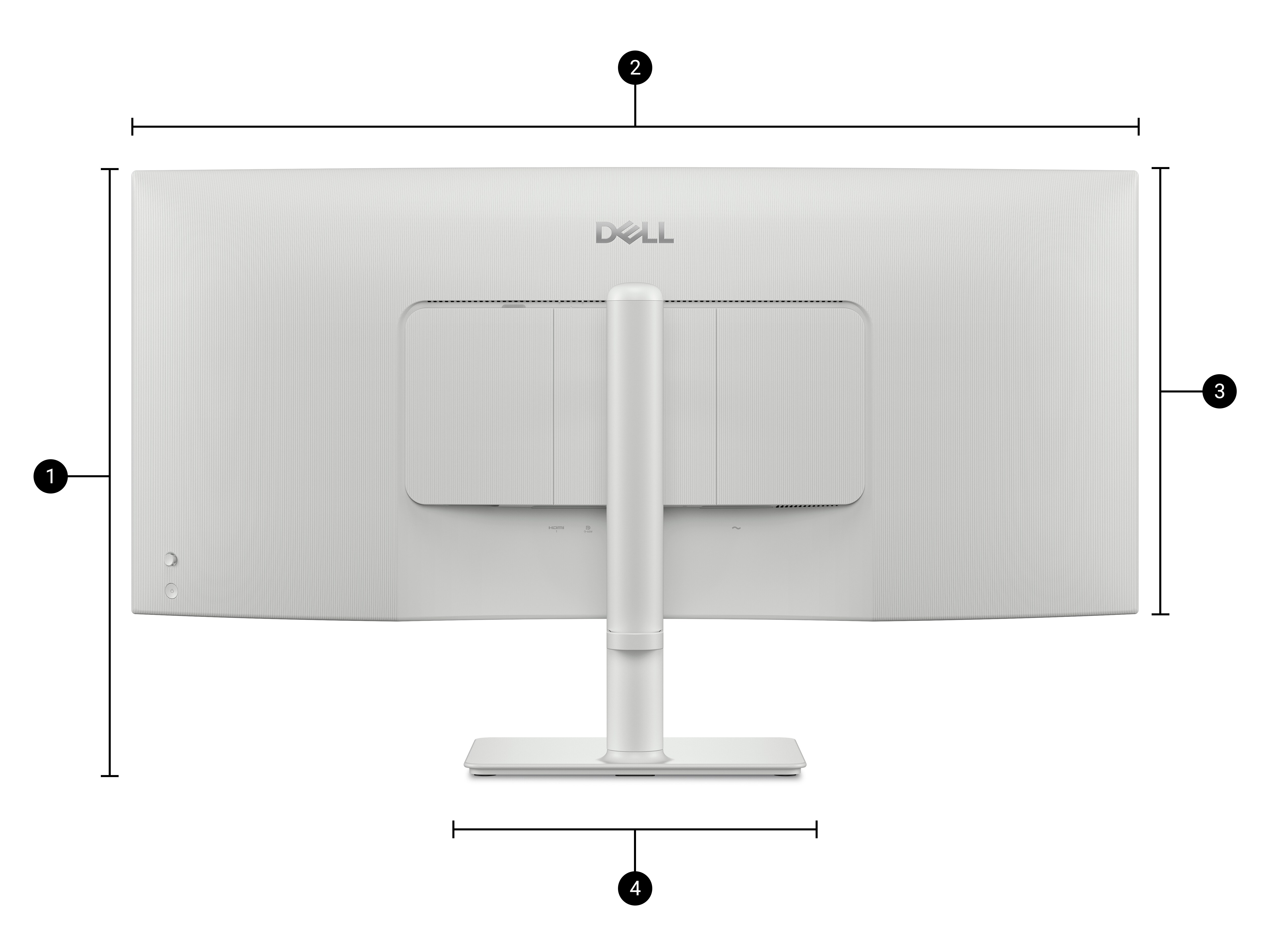
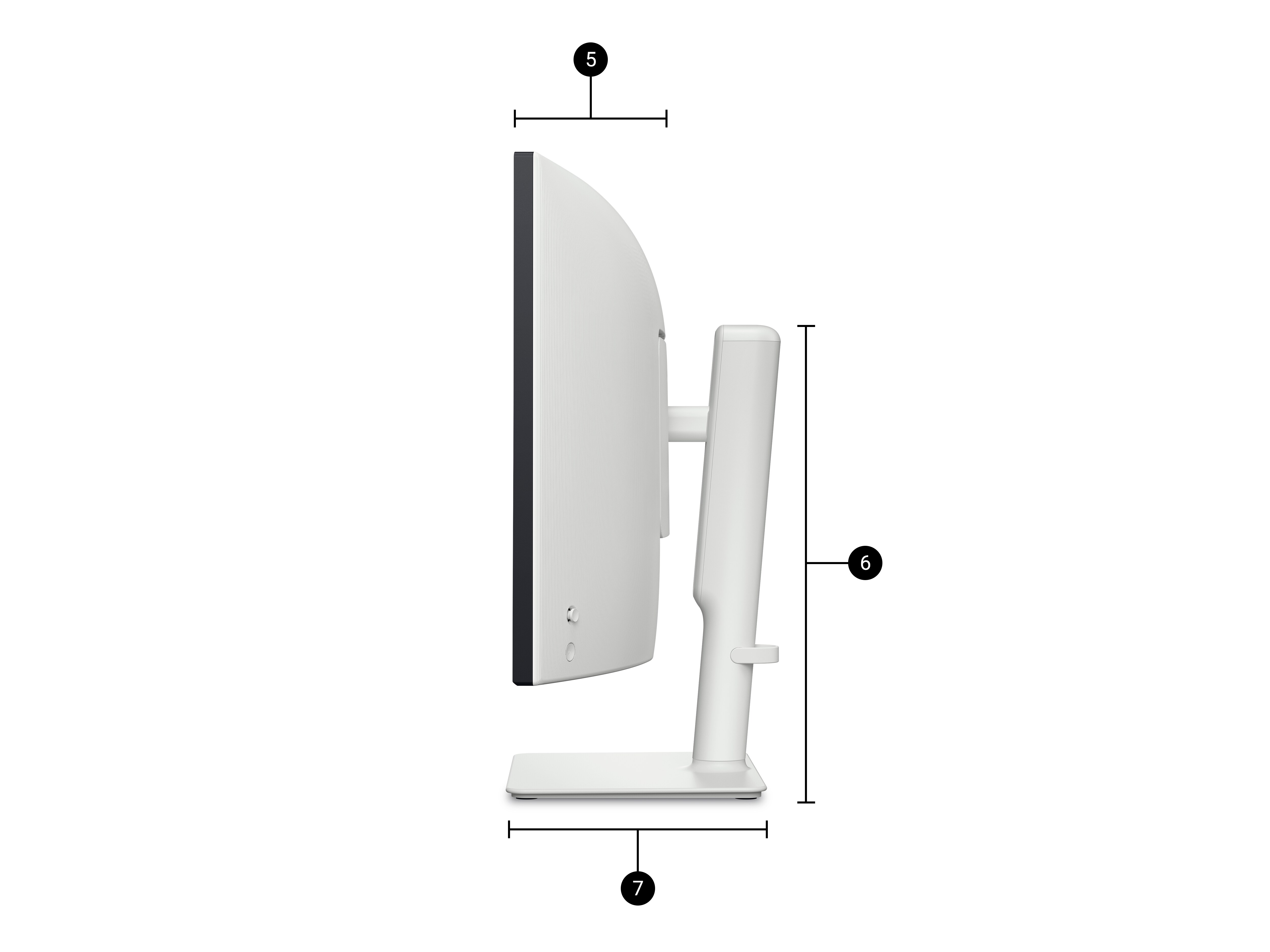
Key Features
- 34-Inch Ultrawide Display: Keep a working document, reference material, and messaging window visible on one screen.
- UWQHD Resolution: A native 3440 × 1440 resolution provides horizontal space for wide tables and detailed timelines.
- 1800R Curvature: The panel curves toward the viewer at the edges for a wraparound desktop view.
- VA Panel Technology: A 3,000:1 native contrast ratio gives dark scenes and shadowed areas greater depth.
- 120Hz Refresh Rate: Supports smoother scrolling and motion at the monitor’s native resolution.
- 1ms GtG Extreme Mode: Offers Dell’s fastest available pixel response setting for fast-moving content.
- AMD FreeSync Premium: Helps reduce screen tearing when paired with a compatible graphics source.
- Wide Color Coverage: Covers 99% of sRGB and 95% of DCI-P3 for web graphics, presentations, and video.
- HDR10 Support: Accepts HDR10 content from a compatible source.
- ComfortView Plus: Built-in low blue light technology supports extended viewing.
- Anti-Glare Surface: Reduces distracting reflections from room lighting.
- USB-C Video and Charging: Connects a compatible laptop to the screen and supplies up to 65W of power.
- Dual HDMI Inputs: Keep two HDMI sources connected, such as a desktop computer and a media device.
- 5Gbps USB Hub: Provides two USB-A accessory ports and one downstream USB-C port.
- Quick-Access Ports: Front pop-out USB ports make it easier to plug in a portable drive or charging cable.
- Picture-by-Picture and Picture-in-Picture: View content from two compatible inputs side by side or in an inset window.
- Integrated Stereo Speakers: Two 5W speakers provide desktop audio for video, training, and entertainment.
- Adjustable Stand: Height, tilt, and slant adjustments help align the screen with the user’s seating position.
- VESA Mount Compatibility: Supports compatible monitor arms and brackets with a 100 × 100mm pattern.
Technical Specifications (At a Glance)
- Brand: Dell
- Product Series: Dell 34 Plus USB-C Monitor
- Model Number: S3425DW
- Product Type: Curved ultrawide desktop monitor with USB-C hub and speakers
- Screen Size: 34 inches
- Panel Technology: Vertical Alignment (VA)
- Screen Curvature: 1800R
- Native Resolution: 3440 × 1440 pixels (UWQHD)
- Aspect Ratio: 21:9
- Maximum Refresh Rate: 120Hz at native resolution
- Response Time: 1ms GtG in Extreme mode, 3ms GtG in Fast mode, 5ms GtG in Normal mode
- Brightness: 300 cd/m² typical
- Native Contrast Ratio: 3,000:1
- Color Support: Up to 1.07 billion colors
- Color Gamut: 99% sRGB and 95% DCI-P3
- Pixel Density: 109 pixels per inch
- Viewing Angles: 178° horizontal and 178° vertical
- HDR Format: HDR10
- Adaptive Sync: AMD FreeSync Premium
- Eye Comfort: ComfortView Plus and 4-star eye comfort certification
- Screen Surface: Anti-glare with 3H hardness
- HDMI Inputs: 2 × HDMI supporting up to 3440 × 1440 at 120Hz
- USB-C Upstream: 1 × USB-C 5Gbps with DisplayPort 1.4 Alt Mode and up to 65W Power Delivery
- USB-A Downstream: 2 × USB-A 5Gbps, including one with Battery Charging 1.2
- USB-C Downstream: 1 × USB-C 5Gbps with up to 15W Power Delivery
- Audio: 2 × 5W integrated speakers, 10W total output
- Multi-Source Display: Picture-by-Picture and Picture-in-Picture
- Stand Adjustment: Height adjustment, −5° to +21° tilt, and ±4° slant
- VESA Mounting Pattern: 100 × 100mm
- Dimensions with Stand: 807.32mm wide × 221.85mm deep × 411.53–517.18mm high
- Weight: Approximately 9.38kg with stand and cables, 6.91kg without stand and cables
- Finish: Black front bezel with a light-colored housing and stand. Dell describes the finish as Ash White, and the UAE listing describes it as Silver.
34-Inch UWQHD Workspace for Side-by-Side Applications
The Dell S3425DW offers 3440 horizontal pixels across a single 21:9 desktop. An accounts user can keep an invoice beside a ledger, while a video editor can expand a timeline and still leave room for preview controls.
The screen’s 1440-pixel height provides space for document text, spreadsheet rows, and application toolbars. Dell’s Easy Arrange feature can divide the desktop into repeatable window layouts for frequently used applications.
1800R Curved VA Panel with 3,000:1 Contrast
The 1800R curve brings the outer edges of the 34-inch panel toward a centrally seated viewer. This is useful when following a long row of figures from one side of the display to the other or viewing a game that supports an ultrawide field of view.
The VA panel’s 3,000:1 native contrast ratio also suits darker material. Shadow detail in a film, pale text in a dark editor, and brightly colored chart elements can all benefit from the separation between light and dark areas.
120Hz Refresh Rate and Selectable Response Modes
The Dell 34 Plus supports 3440 × 1440 at up to 120Hz. Users can see the difference in moving content when scrolling through a long webpage, dragging windows across the desktop, or tracking movement in a compatible game.
Dell specifies three gray-to-gray response settings. Normal mode is rated at 5ms, Fast mode at 3ms, and Extreme mode at 1ms. AMD FreeSync Premium can also synchronize the display with a compatible graphics source to reduce visible tearing during gameplay.
Wide Color Coverage and HDR10 Playback
The S3425DW covers 99% of the sRGB color space and 95% of DCI-P3. This makes it suitable for reviewing website graphics, assembling presentations, and viewing video content on the same display.
HDR10 support lets the monitor receive compatible HDR video. For HDR playback, enable HDR on the connected computer or media device and select content available in that format.
USB-C Laptop Connection with up to 65W Charging
The upstream USB-C port combines DisplayPort video, USB accessory data, and up to 65W of laptop charging. A compatible notebook can connect to its display, keyboard, and mouse when the user plugs in one cable at the desk.
The laptop’s USB-C port must support DisplayPort Alt Mode for video and USB Power Delivery for charging. For a notebook supplied with a higher-wattage adapter, check its charging requirements before relying on the monitor as the primary power source.
Dual HDMI Inputs and Two-Source Viewing
Two HDMI inputs make it possible to leave a desktop and a second HDMI device connected. The USB-C video input remains available for a compatible laptop.
Picture-by-Picture places two supported sources beside each other, useful when comparing work from two computers. Picture-in-Picture keeps the main source in view and places the second source in a smaller window.
Quick-Access USB Ports and Built-In Stereo Sound
The USB hub provides two USB-A ports and one downstream USB-C port for accessories. The front pop-out connections are useful for items that move between desks, such as an external drive or phone. The downstream USB-C port supplies up to 15W to a compatible device.
Two integrated 5W speakers handle desktop audio without occupying additional space beside the display. Select the Dell monitor as the audio output on the connected device to play sound through the screen.
ComfortView Plus and Anti-Glare Viewing
Dell ComfortView Plus reduces blue light output at the display. The S3425DW also carries a 4-star eye comfort certification and uses an anti-glare surface to soften reflections from its wide panel.
Height and tilt adjustments let users position the screen for their seating height and room lighting. The slant adjustment helps level the long top edge of the display on the desk.
Stand Dimensions and Monitor Arm Compatibility
The Dell S3425DW measures approximately 807mm across, and the included stand is about 222mm deep. With the stand extended, the monitor reaches approximately 517mm high. These measurements help when planning a desk beneath overhead shelving.
For an arm-mounted setup, use a 100 × 100mm VESA mount rated for a 34-inch curved screen and a panel weighing approximately 6.91kg without the stand and cables.
Ideal For
- USB-C Laptop Workstations: Connect the display, desk accessories, and compatible laptop charging through one upstream cable.
- Finance and Accounts: View additional spreadsheet columns while keeping an invoice or reference document open.
- Video Editing: Extend the editing timeline across the ultrawide desktop.
- Software Development: Keep an editor, documentation, and a browser preview visible together.
- Two-Computer Setups: Monitor two supported video sources using Picture-by-Picture or Picture-in-Picture.
- PC Gaming: Use ultrawide resolution, up to 120Hz, and FreeSync Premium with supported hardware and games.
- Movies and Streaming: Enjoy compatible widescreen content with integrated stereo audio.
- Home Offices: Use one adjustable screen for daytime productivity and evening entertainment.
Benefits of Dell 34 Plus USB-C Monitor S3425DW
- Creates a continuous 34-inch workspace for tasks that span multiple windows.
- Shows wide spreadsheets and editing timelines without a bezel across the center.
- Simplifies laptop arrival and departure with a single compatible USB-C connection.
- Keeps two HDMI sources connected and ready for input selection.
- Displays two compatible sources together when comparing computers or monitoring another system.
- Combines smooth 120Hz motion with selectable pixel response modes.
- Keeps frequently used USB accessories accessible from the front of the desk.
- Provides stereo sound without requiring separate desktop speakers.
Important Product Information
- The maximum native display mode is 3440 × 1440 at 120Hz. The source device, cable, and any dock or adapter must support the selected mode.
- The advertised 1ms figure is a gray-to-gray pixel response rating in Extreme mode. Overall system input latency is a separate measurement.
- The upstream USB-C port handles laptop video and up to 65W charging. The downstream USB-C accessory port supplies up to 15W.
- When HDMI carries the picture, connect the monitor’s USB-C upstream port to the computer to use the monitor’s USB hub.
- AMD FreeSync Premium and HDR10 require compatible source hardware and settings.
- Games and video must support an ultrawide format to fill the panel at their original proportions. Standard 16:9 content may display with side bars.
- Check the desk width or monitor arm capacity before installing this 34-inch curved display.
- Dell service eligibility and regional warranty coverage are subject to the terms applicable to the supplied unit.
Why Choose Dell 34 Plus USB-C S3425DW?
The Dell S3425DW suits users who move between a laptop, a desktop, and entertainment on the same desk. Its 34-inch curved screen gives wide documents and timelines room to spread out, while two HDMI inputs and USB-C accommodate different devices.
The practical advantage for a laptop user is the one-cable setup. Leave accessories attached to the monitor, connect a supported notebook through USB-C, and the display, USB hub, audio, and up to 65W charging are available together.
Why Buy from IT Splendid UAE?
At IT Splendid UAE, we offer monitors, laptops, desktop computers, docking stations, connectivity accessories, and professional IT equipment for home and business workspaces.
- Wide Monitor Selection: Explore ultrawide monitors, USB-C displays, and desktop screens for work and entertainment.
- Competitive Pricing: Compare monitor configurations for different workspace requirements and budgets.
- Convenient Online Shopping: Browse monitors, compatible cables, docking stations, and computer accessories online.
- UAE Delivery: Delivery options are available across Dubai, Abu Dhabi, Sharjah, Ajman, Ras Al Khaimah, Fujairah, and Umm Al Quwain, subject to availability.
- Professional IT Solutions: Find display and connectivity products for individual desks, home offices, and business workstations.
Expand Your Workspace with the Dell 34 Plus USB-C Curved Monitor
Bring your applications, devices, and entertainment together with the Dell 34 Plus USB-C Curved Monitor – S3425DW. Its 34-inch UWQHD display gives your work room to breathe, while 120Hz motion, integrated stereo speakers, and up to 65W USB-C charging make it a versatile centerpiece for your desk. Shop the Dell S3425DW at IT Splendid UAE.
Your Question
-

Free Delivery
For all orders over AED 499
-

Cash On Delivery
For All Over Country
-

Express Delivery
Within 24 Hours
-

7 Days Free Returns
If goods have problems


- Choosing a selection results in a full page refresh.
- Opens in a new window.